

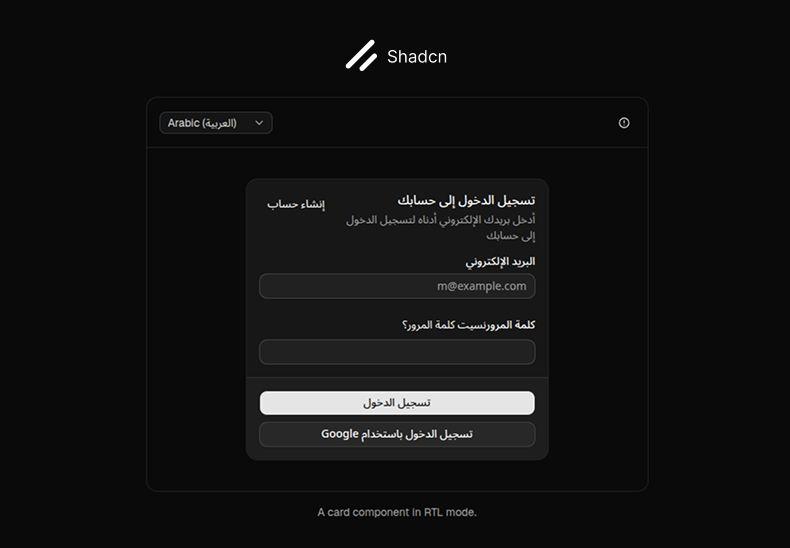
shadcn/ui has officially introduced native (first-class) RTL support, enabling components to work seamlessly in both LTR and RTL layouts. This update eliminates the long-standing pain of manually flipping classes, adjusting layouts, and maintaining separate styles for different text directions.
With this built-in RTL support, components automatically handle:
Text alignment
Direction-aware positioning
Spacing and layout adjustments
Icons and directional animations
This makes shadcn/ui a strong choice for building interfaces in Arabic, Hebrew, Persian, and other right-to-left languages.
How RTL Works in shadcn/ui
When installing components, the shadcn CLI automatically transforms direction-dependent styles into logical properties, ensuring the same component works correctly in both RTL and LTR contexts.
What the CLI handles automatically:
Physical classes like left-* and right-* → logical equivalents such as start-* and end-*
Directional props updated to logical values
Text alignment and spacing adjusted based on document direction
Supported icons automatically flipped using rtl:rotate-180
Enabling RTL in Your Project
To install components with RTL support, make sure the following option is enabled in your components.json file:
{
"rtl": true
}
Any component added after this will be RTL-aware by default.
Migrating Existing Components
If your project already contains components added before enabling RTL, you can migrate them using the CLI:
npx shadcn@latest migrate rtl
This command updates classes and directional props to be RTL-compatible.
Note: Some components (such as Calendar, Pagination, and Sidebar) require manual migration. Refer to the official documentation for component-specific RTL instructions.
Icons
Some directional icons (e.g. ArrowRightIcon, ChevronLeftIcon) need to be flipped explicitly by adding:
<ArrowRightIcon className="rtl:rotate-180" />
Animations
The CLI also handles directional animations automatically:
slide-in-from-right → slide-in-from-end
This ensures dropdowns, popovers, and tooltips animate in the correct direction based on the document’s text direction.
tw-animate-css note: There is a known issue where logical slide utilities do not work as expected. For now, pass the dir prop to portal components such as Tooltip and Popover.
Font Recommendations
For the best RTL experience, shadcn/ui recommends using fonts with proper RTL support:
Noto (excellent for Arabic)
Works well alongside Inter and Geist
Conclusion
Official RTL support in shadcn/ui is more than a small improvement—it’s a major step forward for building modern, multilingual interfaces.
Cleaner code, faster workflows, and production-ready RTL layouts without unnecessary complexity.