Introduction
Applying to multiple jobs can quickly become a repetitive process. Each application usually requires reviewing the job description, extracting the relevant requirements, writing a tailored email, attaching the CV, and finally sending and tracking the application.
To automate this process, I built a Job Application Assistant using n8n, connecting Telegram, AI models, Google Drive, and Gmail into a single automated workflow.
The goal is simple: send a job posting to the assistant, let the workflow process the information, generate a tailored application, and send it automatically.
How the Workflow Works
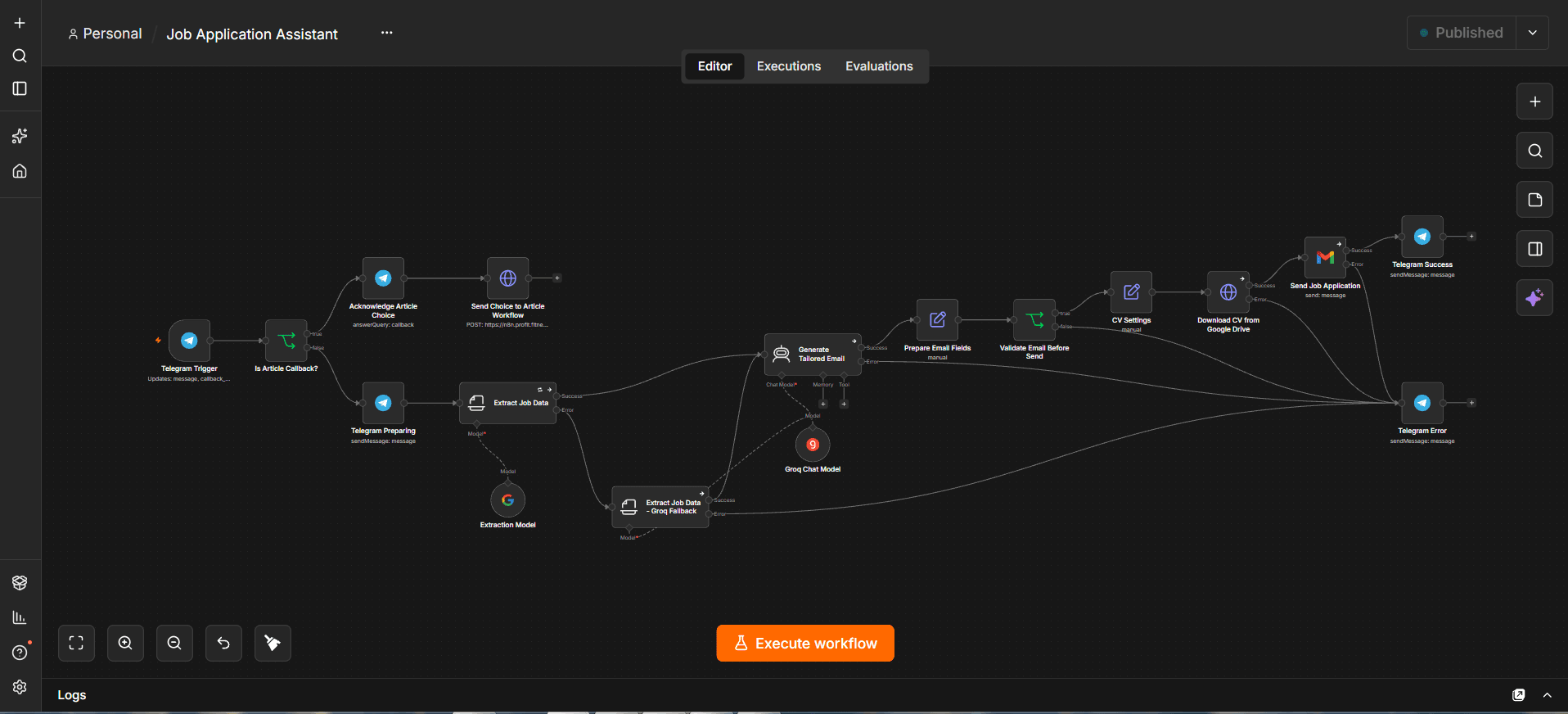
The workflow starts with a Telegram Trigger, which receives the user's message containing the job posting.
The workflow then determines whether the incoming Telegram event is related to an article callback or an actual job application. For job applications, the process continues through the automation pipeline.
1. Extracting Job Information
The job description is passed to an AI-powered information extraction step.
The workflow extracts important information such as:
Application email address.
Job title.
Company name.
Job location or work arrangement.
Required experience level.
Key technical and professional requirements.
The extraction prompt is explicitly designed to avoid inventing an application email when one is not present in the original job posting.
2. AI Fallback
Reliability is an important part of the workflow.
The primary extraction model is connected to a Groq-powered fallback path. If the main extraction step fails, the workflow can route the job description through the alternative extraction model.
This prevents the entire application process from depending on a single AI provider or model.
3. Generating a Tailored Application Email
Once the job information has been extracted, it is passed to an AI Agent responsible for generating the application email.
Instead of using a generic template, the agent receives both the current job requirements and verified candidate information.
It then selects the most relevant experience and technical skills for the specific vacancy.
The workflow also includes explicit rules for senior positions. If a role requires senior-level experience, the generated email must acknowledge the experience gap instead of falsely presenting the candidate as a Senior Developer, Lead, or Architect.
4. Validating the Email
Before anything is sent, the workflow extracts the final:
Recipient email.
Email subject.
Email body.
A dedicated validation step checks that all three values are present.
If any required field is missing, the workflow stops the sending process and routes the execution to the error notification path.
This adds an important safety layer between AI-generated content and the actual email delivery.
5. Downloading the CV
After the email passes validation, the workflow retrieves the configured CV file from Google Drive.
The file is downloaded as binary data and prepared for attachment to the outgoing Gmail message.
This removes another manual step from the application process.
6. Sending the Application
The final email is sent through Gmail using the generated subject and tailored HTML body.
The downloaded CV is automatically attached to the message before it is delivered to the recipient.
The complete process therefore goes from a raw job posting to a ready-to-send application without requiring the user to manually copy the recruiter email, write the message, or attach the CV.
7. Telegram Notifications and Error Handling
Telegram is also used as the workflow's feedback interface.
When the process starts, the user receives a preparation message indicating that the job posting is being analyzed.
If the application is successfully sent, Telegram provides a confirmation containing the recipient email, job title, and company.
If something goes wrong, the workflow sends an error notification instead. The application is not treated as successfully sent unless the sending step completes successfully.
The Automation Architecture
At a high level, the workflow follows this architecture:
Telegram → Job Data Extraction → AI Fallback → Tailored Email Generation → Validation → Google Drive → Gmail → Telegram
n8n acts as the orchestration layer connecting the different services and AI components while handling branching, validation, fallbacks, and notifications.
Conclusion
The Job Application Assistant turns a repetitive job application process into an automated pipeline:
Send Job Posting → Extract Data → Analyze Requirements → Generate Tailored Email → Validate → Download CV → Send Application → Confirm Result
The important part is not only the AI-generated email. The workflow also combines validation, fallback processing, conditional routing, file handling, and error notifications to make the automation more reliable and prevent incomplete applications from being sent.